


Ancestry: Family History & DNA
4.631.19K Reviews
App Specs
- Version
- Varies with Device
- Updated On
- License
- Free
- Downloads
- 10,000,000+
- Developer
- Ancestry.com
- Categories
- Books & Reference
- Platform
- Android, iOS
Screenshots
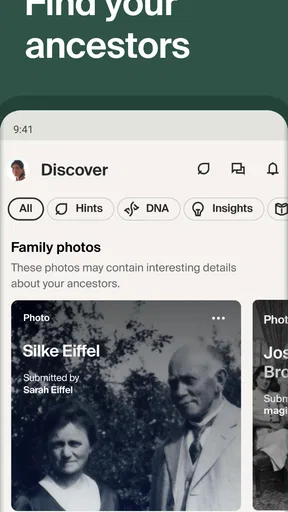
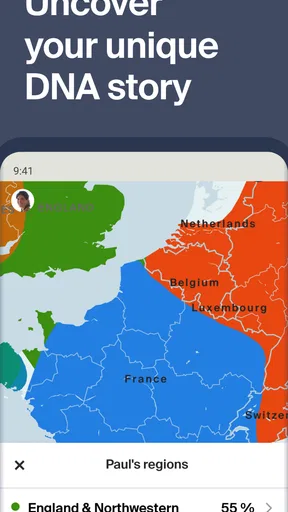
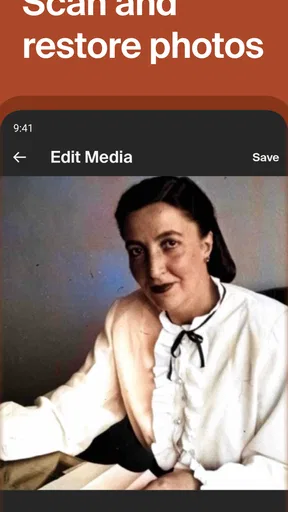
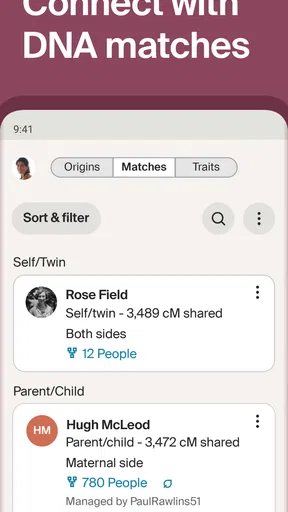
 Analysis by AppCompare
I find family-history research most rewarding when I treat it as a series of small questions rather than expecting a complete story in one sitting. Ancestry: Family History & DNA brings tree-building and genealogy research together in a mobile app from Ancestry.com. It is free to download, and its Books & Reference category makes sense: the core activity is collecting, checking and connecting information about people. I would recommend it to anyone who wants to get a family tree started, but I would go in with patience. The app can help organize an investigation; it cannot make every clue reliable or every search straightforward.
Exploring Your Roots
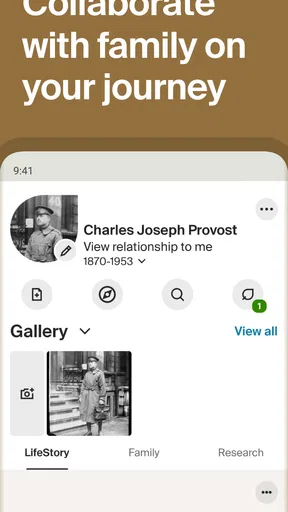
The first thing that caught my eye was the sheer amount of data available. Ancestry: Family History & DNA isn’t just about tracing your lineage; it’s about connecting the dots in your family's past. The app makes it super easy to create your family tree. You start by adding a few details about yourself and your immediate family, and from there, the app practically takes you by the hand.
Where research can get stuck
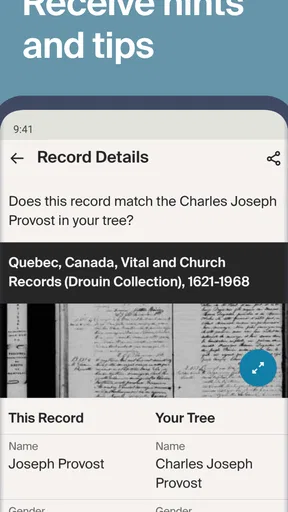
The hand-holding is useful at the beginning, but family research quickly becomes less tidy than a tree diagram suggests. Names may be spelled differently in old records, relatives can share the same name, and a document that looks like a match may refer to the wrong person. I find it safer to treat a hint as a lead, not as proof. Before attaching a record, I compare its names and dates with what I already know and look for details that connect it to the right branch.
That habit matters because one mistaken connection can make later discoveries look convincing while sending the whole line in the wrong direction. When two candidates seem plausible, I leave the question open and note what would distinguish them, such as a location or a relative’s name. It is less satisfying than immediately filling every gap, but it keeps the tree useful instead of merely impressive-looking.
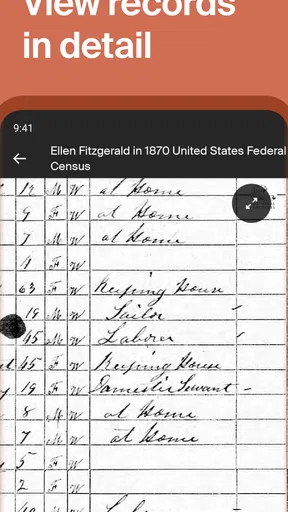
One of the coolest features is the ability to access historical records. We’re talking about census data, birth and death certificates, and even immigration records. It's like being a detective, uncovering little nuggets of information that piece together your family's story. I found records of my ancestors I never knew existed – it was an emotional and enlightening experience.
A steadier way to build a tree
For a first session, I would add only the relatives and facts I can confidently name: parents, grandparents, approximate places, and dates if I know them. Then I would choose one unanswered question and search around it. This gives the research a useful boundary. Rather than collecting every promising record, I can ask whether a result supports a particular relationship or simply shares a familiar name.
A practical everyday example is a family conversation over dinner. If a relative mentions that a grandparent moved between towns, I can write down the place names and ask which person or event they remember before searching. Later, I can compare that family recollection with records and keep the source attached to the person it actually describes. This makes the app more valuable as a shared research notebook than as a quick answer machine.
Worth Reading Before You Choose

Flipboard Shows What News Apps Must Do Beyond the Feed

Switching to Android Auto Means Rethinking Your Driving Routine

Google Calendar Makes a Crowded Week Easier to Manage

Ludo King Makes the Most of the Minutes Between Plans

Baby Panda World Brings Quick Play to Modern Phones, but Its Game Library Feels Busy

ESPN’s Live Game View Makes Following Close Games Easier
One trade-off is that a phone is convenient for capturing a clue but not always ideal for careful comparison. Long names, dates and family branches can be harder to inspect on a small screen, especially when several records appear relevant. I use mobile sessions to add known details, review a promising hint or make a note for later; for a complicated relationship, I slow down and check the surrounding information rather than accepting a match just to keep moving.
DNA and Beyond
If you think the family tree is exciting, wait until you explore the DNA features. After sending in a simple DNA kit (think swab, not needle), the app provides a detailed ethnicity estimate. I was floored by how specific the results were – regions and countries I hadn’t even considered popped up. It’s fascinating to see how our DNA connects us to different parts of the world.
Beyond just ethnicity, the app also connects you with potential relatives. I actually ended up chatting with a third cousin who lives halfway across the globe! It’s these connections that make the app more than just a tool; it becomes a community.
I would approach DNA results as one strand of research, not a replacement for family documents or conversations. An ethnicity estimate can prompt new questions, but it does not by itself identify a particular ancestor or explain exactly how a family moved. Potential-relative matches can also be more useful when I already have a tree to compare against. If I am considering DNA mainly for a specific family mystery, I would first think through what kind of answer I hope to find and whether a broad estimate would actually help.
Setup checks and getting back on track
A little preparation makes the first use smoother. I gather the spellings, relationships and locations I already trust before I start adding branches, and I keep uncertain details separate from confirmed ones. The app’s current version is 17.24.2, and it requires Android 9 or later. It is rated for Everyone, but the family material itself can be personal, so I would decide which relatives’ details I am comfortable entering and sharing before building a large tree.
If a search seems to lead nowhere, I do not assume the person is missing from history. I try a different spelling, search with fewer details, or start from a known relative and work outward. If I have added the wrong person or attached a questionable record, I pause before building on that branch and retrace the connection from the last fact I trust. That simple recovery approach is more useful than repeatedly running the same narrow search.
Notifications can be handy when a new hint appears, but I treat them as invitations to review, not instructions to accept. A quick check of the record’s context often matters more than how promising the notification sounds. For a focused session, I also decide in advance whether I am looking for a particular person, checking a date, or recording a relative’s account; that prevents the stream of possible leads from turning a short visit into aimless browsing.
When the app may not be the cause
Not every frustrating search points to an app problem. Historical records can be incomplete, names can change, and a family story may have been passed down with an approximate date or place. When results appear inconsistent, I check my own spelling and the details I entered first, then broaden the search rather than treating one blank result as a dead end. If a record takes time to load, I also check that the connection is working before repeating the same action.
The app is less suited to someone who wants a finished family history without doing the checking. It is also not my first choice if I only want a simple, private list of relatives with no interest in records or wider research. A basic document or family-tree tool may feel more direct for that purpose. Compared with keeping names in a notebook or spreadsheet, Ancestry gives research a more connected place to grow; compared with a paper chart, it is easier to explore leads, but the digital prompts still need human judgement.
User Experience and Design
The app’s design is intuitive and user-friendly, which is a big plus for those of us who aren’t tech-savvy. Navigating through different sections is seamless, and the layout is clean and visually appealing. I found the search function to be quite robust, making it easy to find specific records or family members without getting lost in a sea of data.
Notifications are also a nifty feature, keeping you updated on new matches or hints in your family tree. It’s like having a little nudge that reminds you to keep exploring.
There is a difference between finding a record and being able to use every part of the service without cost. The app is free, while in-app purchases range from $0.99 to $169.99 per item. I would start by building a small tree and seeing whether the available experience suits my research before spending money. For anyone who wants to explore records more deeply, it is sensible to check what a particular purchase covers and whether that is relevant to the question at hand, rather than assuming every promising clue requires an immediate purchase.
The Journey Continues
So, what’s my verdict? Ancestry: Family History & DNA is more than just an app; it’s a gateway to understanding yourself and your heritage. Whether you’re a history buff or just someone with a curious mind, this app offers a unique way to connect with the past.
Its scale helps explain the appeal: it has a 4.6 average from around 168,000 ratings and over 10 million installs. Those figures suggest a well-established audience, but they do not guarantee that every search will be easy or every record will answer a personal question. I would recommend it most to people willing to build carefully, revisit uncertain clues and enjoy the detective work along the way. If you prefer a quick, definitive account of your ancestry, or only need a simple offline family list, another approach may suit you better.
In a world where we often feel disconnected, this app brings a sense of belonging and understanding. If you’ve ever wanted to know more about your family’s history, this is the tool to get you started. Happy exploring!
Pros
- Comprehensive family tree builder.
- Access to vast historical records.
- DNA matching feature included.
- User-friendly interface design.
- Regular updates and improvements.
Cons
- Subscription required for full access.
- Large database can overwhelm beginners.
- Occasional app crashes reported.
- Limited offline functionality.
- Privacy concerns with DNA data.
FAQs for Ancestry: Family History & DNA
What features does the Ancestry app offer for family history research?
The Ancestry app provides a comprehensive suite of tools for family history research, including access to billions of historical records, family tree creation, and personalized insights. Users can explore census data, birth and marriage certificates, and military records. Additionally, the app allows for easy collaboration with family members and integrates DNA results for deeper insights.
How does the DNA testing work in the Ancestry app?
The Ancestry app offers DNA testing that provides users with a detailed ethnicity estimate and identifies genetic matches with potential relatives. After purchasing a DNA kit, users send a saliva sample to the lab. Once processed, the results are accessible in the app, offering insights into heritage and connections with other Ancestry users.
Is the Ancestry app free to use, or does it require a subscription?
While the Ancestry app itself is free to download, access to its full range of features requires a subscription. Users can explore different subscription plans, offering various levels of access to historical records and family tree tools. However, DNA test results are accessible without a subscription once the test is purchased and completed.
Can I collaborate with family members on the Ancestry app?
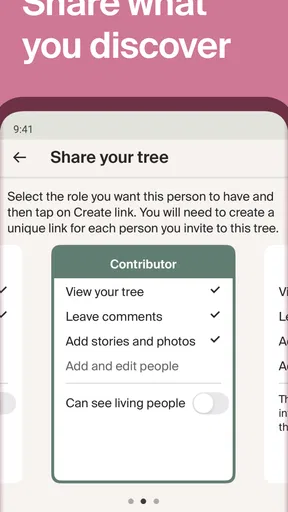
Yes, the Ancestry app supports collaboration by allowing users to share their family trees with relatives. This feature encourages family members to contribute information, photos, and stories, enhancing the overall family history experience. Users can control privacy settings to manage who can view and edit their family tree information.
What privacy measures does the Ancestry app have for user data?
Ancestry takes user privacy seriously, implementing robust security measures to protect personal data. Users have control over their privacy settings and can choose what information is shared. DNA results are kept confidential, and users can opt out of sharing their genetic information with matches and third parties. Ancestry also adheres to strict data protection regulations.


